

 222
222
 0
0
Your GNSS receiver appears to be working, but your application or tracking platform still shows no location.
Where should you start?
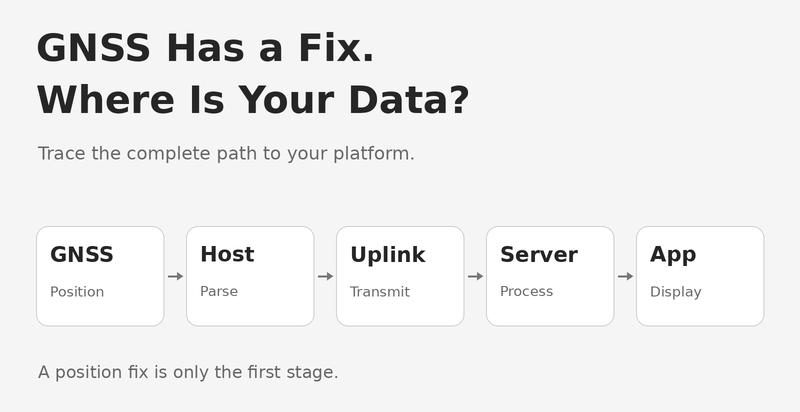
Follow the data through the complete system. A position calculated by the receiver must reach the host, be interpreted correctly, and then be delivered to the application or server.

A typical connected positioning device follows this path:
GNSS Receiver → Host Controller → Communication Link → Server → Application
Each stage has a different role:
- GNSS receiver: Calculates position from satellite signals and outputs positioning data.
- Host controller: Reads and interprets the receiver’s output.
- Communication link: Transfers the required information using the connectivity provided by the device.
- Server and application: Receive, process, store and display the location.
The exact architecture varies by product. A standalone GNSS module should not be assumed to include cellular connectivity, an internet connection or a tracking platform.
Receiving text from the GNSS module confirms that some serial communication is taking place. It does not, by itself, confirm a valid position fix.
Capture the receiver’s raw output and check the position-validity information described in the documentation for that model.
For receivers using NMEA messages, position, time and validity information may be available in messages such as RMC. Interpret the fields according to the receiver’s supported message format.
Record a short sample of the original output before changing the application software.
Next, compare the receiver's raw output with the data received by the host controller.
Does the host receive complete messages? Does its parser support the enabled message types? Is it correctly identifying valid, current position data?
If coordinates are converted into another format, verify that conversion separately. Check latitude, longitude, hemisphere and timestamps against the original message.
A receiver can output usable data while the host application fails to interpret it correctly.
Once the host has a valid position, check whether it creates and sends the expected report.
Depending on the system, this may involve cellular, Wi-Fi, Bluetooth through another device, or another communication path.
Confirm:
- The communication link is available.
- The destination address and port are correct.
- The device uses the protocol expected by the receiving system.
- Required device identifiers or credentials are configured.
- The outgoing report contains the intended coordinates and timestamp.
A working GNSS receiver does not confirm that the upload connection is working.
If the device reports that it has sent data, inspect what the server actually receives.
Compare one outgoing report with its corresponding server record. Confirm the device identity, timestamp and location fields.
If the server receives bytes but does not create a location record, review the protocol decoder and message format. If the location is stored but missing from the application, investigate the display stage, including device selection and time filters.
Avoid changing the GNSS configuration until you know where the data stops.
A small set of matching records is more useful than a screenshot showing an empty map.
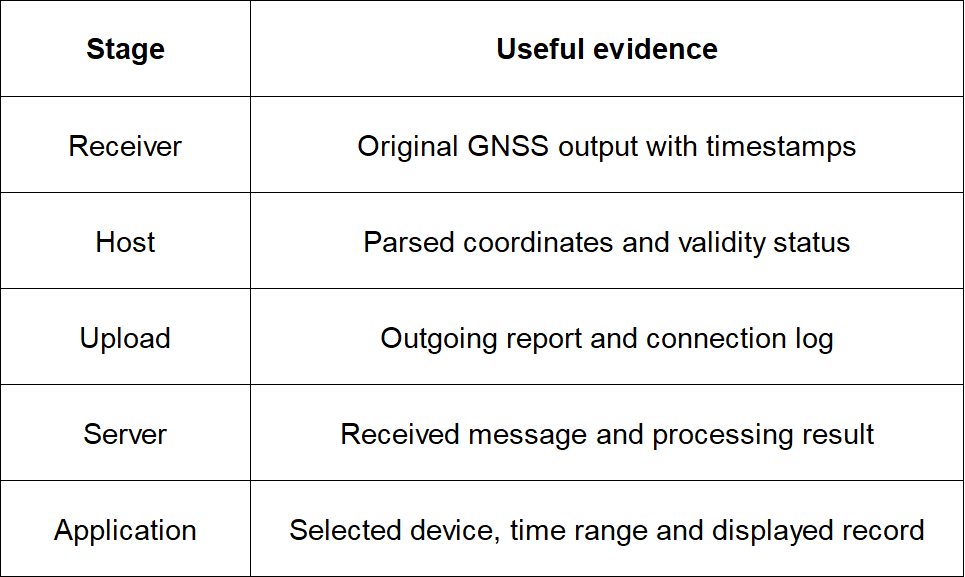
Use records from the same test period so that each stage can be compared.
When discussing a GNSS project with WEILA, explain where positioning data needs to go.
Share your host controller, required receiver interface, communication method and expected output format. Also identify who will provide the firmware, application and server integration.
WEILA supplies GNSS modules and hardware integration support. Application and cloud-platform requirements should be defined separately and confirmed for the proposed project.
Clear responsibilities help turn a working position fix into usable data in your system.
Do not assume so. Check whether the proposed product includes a communication link and the firmware required for uploading data.
No. Check the relevant validity information and timestamp using the receiver’s documentation.
First confirm whether the server has decoded and stored a valid location record. Then check the application’s device selection and display settings.
Provide the exact hardware model, original GNSS output, host parsing results, communication logs and relevant server records from the same test period.
Company Address
Floor 11, Block A, Building 9, Baoneng Science and Technology Park, Qingxiang Road, Longhua District, Shenzhen
Tel: +86 755-8329018
Business Hours
Monday–Friday
9:00 AM–6:00 PM (GMT+8)



+8613247518427



0755-8329018

13602688458

 Previous
 List
List